KerrGeoPy
PythonTimelike geodesics in the Kerr spacetime
pip install kerrgeopy
Geodesics & orbits
Bound timelike geodesics about a Kerr black hole
PacletInstall["KerrGeodesics"]
The KerrGeodesics package for Mathematica provides functions for computing timelike geodesics and their properties in Kerr spacetime. It can compute:
Many results are available in closed form, and all functions support arbitrary-precision numerical evaluation. KerrGeodesics supplies the orbital motion of the source for other Toolkit packages, such as Teukolsky and ReggeWheeler. A Python implementation of similar functionality is available in KerrGeoPy.
KerrGeodesics is distributed as a paclet. Once the BHPToolkit paclet server is set up (see Get started), install it by name:
PacletSiteRegister["https://pacletserver.bhptoolkit.org", "Black Hole Perturbation Toolkit Paclet Server"]
PacletSiteUpdate["https://pacletserver.bhptoolkit.org"]
PacletInstall["KerrGeodesics"]
<< KerrGeodesics`
Orbits are parametrized by:
The parametrization $\{a,p,e,\theta_\text{inc}\}$ is described in, e.g., Sec. II of arXiv:gr-qc/0509101. The package supports bound orbits and hyperbolic (scattering) orbits with $e > 1$. Plunging orbits are not yet supported.
KerrGeoOrbit[a,p,e,x] returns a KerrGeoOrbitFunction, which stores the trajectory and the orbital
parameters. For generic orbits the trajectory is parametrized by Mino time $\lambda$:
orbit = KerrGeoOrbit[0.998, 3, 0.6, Cos[π/4]];
{t, r, θ, φ} = orbit["Trajectory"];
The object can be queried for other properties, e.g.
orbit["Energy"]
orbit["ConstantsOfMotion"]
orbit["Frequencies"]
orbit["FourVelocity"]
orbit["Type"]
Keys[orbit]   (* list all available properties *)
Evaluating orbit[λ] returns the position $\{t, r, \theta, \phi\}$ at Mino time $\lambda$.
For equatorial orbits the trajectory can instead be parametrized by the Darwin parameter $\chi$ using
"Parametrization" -> "Darwin":
orbitD = KerrGeoOrbit[0.9, 10, 0.5, 1, "Parametrization" -> "Darwin"];
orbitD[2π]
Two methods are available via the "Method" option: "FastSpec" (the default, a spectral method that takes
longer to construct the orbit but is fast to evaluate) and "Analytic" (fast to construct, slower to
evaluate). An orbit can also be constructed from an initial position and four-velocity using
KerrGeoInitOrbit[a, {t0, r0, θ0, φ0}, u].
The constants of motion can be computed individually,
KerrGeoEnergy[a, p, e, x]
KerrGeoAngularMomentum[a, p, e, x]
KerrGeoCarterConstant[a, p, e, x]
or all together, returned as an association, using KerrGeoConstantsOfMotion:
KerrGeoConstantsOfMotion[0.9`20, 10, 0.5`20, Cos[π/3]]
Some cases can be evaluated in closed form, e.g. KerrGeoConstantsOfMotion[0, p, e, 1] for equatorial
Schwarzschild orbits or KerrGeoConstantsOfMotion[a, p, 0, 0] for polar spherical orbits.
KerrGeoFrequencies[a,p,e,x] returns the orbital frequencies with respect to Boyer–Lindquist time $t$.
Pass the option "Time" -> "Mino" to compute them with respect to Mino time, or "Time" -> "Proper" for
proper time:
KerrGeoFrequencies[0.9`20, 10, 0.5`20, Cos[π/3]]
KerrGeoFrequencies[0.9`20, 10, 0.5`20, Cos[π/3], "Time" -> "Mino"]
The package can compute a variety of special orbits: the innermost stable circular orbit (ISCO, defined only for equatorial orbits, $x = \pm 1$), the innermost stable spherical orbit (ISSO), the photon sphere, the innermost bound spherical orbit (IBSO) and the location of the separatrix between stable and plunging orbits. The relevant functions are:
KerrGeoISCO[a, x]
KerrGeoISSO[a, x]
KerrGeoPhotonSphereRadius[a, x]
KerrGeoIBSO[a, x]
KerrGeoSeparatrix[a, e, x]
Many of these return analytic results for symbolic arguments, e.g. KerrGeoISCO[a, 1] or
KerrGeoSeparatrix[0, e, x], which gives $6 + 2e$.
KerrGeoOrbitType[a,p,e,x] classifies an orbit, returning e.g. {"Bound", "Eccentric", "Inclined"}
or {"Bound", "Circular", "MarginallyStable", "Equatorial"}.
KerrGeoFindResonance locates $r$–$\theta$ resonances. Given $\{a, x\}$ and one of $\{p, e\}$ it solves
for the remaining parameter. For example, the 1:2 resonance for $a=0.9$, $e=0.5$, $x=0.5$:
KerrGeoFindResonance[<|"a" -> 0.9, "e" -> 0.5, "x" -> 0.5|>, {1, 2, 0}]
Passing $e > 1$ to KerrGeoOrbit gives a scattering orbit (computed with the "Analytic" method). For such
orbits orbit["ConstantsOfMotion"] additionally contains the scattering angle $\psi$ and the inclinations of
the incoming and outgoing legs, and orbit["ParameterRange"] gives the range of Mino time between past and
future null infinity. For equatorial Schwarzschild scattering orbits, KerrGeoConstantsOfMotion[0, p, e, 1]
also returns the velocity at infinity $v_\infty$, the impact parameter $b$ and the scattering angle $\psi$.
KerrGeoFourVelocity[a,p,e,x] returns the components of the four-velocity as functions of Mino time
(use "Covariant" -> True for the covariant components):
{ut, ur, uθ, uφ} = Values[KerrGeoFourVelocity[0.9, 10, 0.2, 0.5]];
ut[10]
KerrParallelTransportFrame[a,p,e,x] returns a KerrParallelTransportFrameFunction storing a frame
parallel-transported along the orbit, together with the trajectory and orbital parameters.
See the Mathematica Documentation Centre for a tutorial and documentation on individual functions.
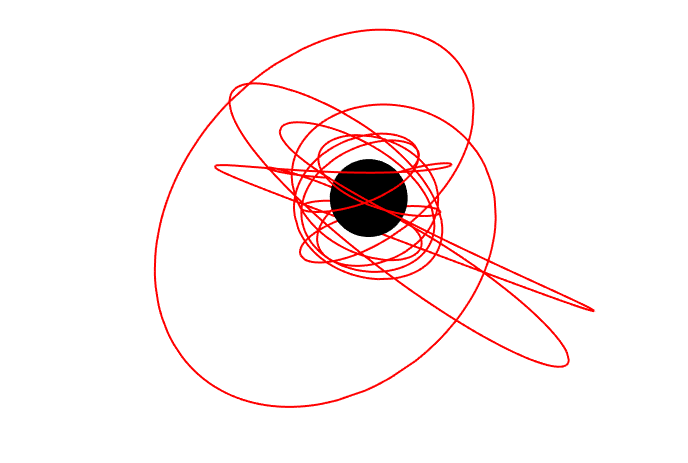
The figure at the top of this page is made with:
orbit = KerrGeoOrbit[0.998, 3, 0.6, Cos[π/4]];
{t, r, θ, φ} = orbit["Trajectory"];

Show[
 ParametricPlot3D[{r[λ] Sin[θ[λ]] Cos[φ[λ]], r[λ] Sin[θ[λ]] Sin[φ[λ]], r[λ] Cos[θ[λ]]}, {λ, 0, 20},
  ImageSize -> 700, Boxed -> False, Axes -> False, PlotStyle -> Red, PlotRange -> All],
 Graphics3D[{Black, Sphere[{0, 0, 0}, 1 + Sqrt[1 - 0.998^2]]}]
]
With[{a = .998, r0 = 4, e = .6, x = .9, from = 0, to = 15, view = {50, 200, 50}, color = RGBColor["#de4037"]},
    Module[{spherePlot, spherePlotGlow, orbitPlot, radius, orbit,points},
        orbit = KerrGeoOrbit[a, r0, e, x];
        radius = 1 + Sqrt[1 - a^2];
        {t, r, ϑ, φ} = orbit["Trajectory"];
        points = Table[Re@{r[λ] Sin[ϑ[λ]] Cos[φ[λ]],r[λ] Sin[ϑ[λ]] Sin[φ[λ]], r[λ] Cos[ϑ[λ]]}, {λ, from, to, (to - from)/2000}];
        orbitPlot = Graphics3D[{color, Thickness[.005], Line[points]}];
        spherePlot = Graphics3D[{Black, Sphere[{0, 0, 0}, radius]}];
        spherePlotGlow = Graphics3D[{Opacity[.4], Glow[Lighter[Blue, .8]], Black, EdgeForm[None], Cylinder[{0.1 radius view/view . view, -0.1 radius view / view . view}, radius + .2]}];
        plot = Show[orbitPlot, spherePlot, spherePlotGlow, ViewPoint -> view, Boxed -> False, Axes -> False, PlotRange -> All, Background -> None, BaseStyle -> {RenderingOptions -> {"3DRenderingMethod" -> "BSPTree"}}]
    ]
]
Find the 1:2 $r$–$\theta$ resonance and verify that the ratio of the polar and radial frequencies is 2:
pRes = KerrGeoFindResonance[<|"a" -> 0.9, "e" -> 0.5, "x" -> 0.5|>, {1, 2, 0}];
"\!\(\*SubscriptBox[\(Ω\), \(θ\)]\)"/"\!\(\*SubscriptBox[\(Ω\), \(r\)]\)" /. KerrGeoFrequencies[0.9, "p" /. pRes, 0.5, 0.5]
Further example notebooks can be found in the Mathematica Toolkit Examples repository.
Niels Warburton, Maarten van de Meent, Zach Nasipak, Thomas Osburn, Charles Evans, Leo Stein, Philip Lynch, Oliver Long, Barry Wardell, Sam Upton
If you use KerrGeodesics in your research, please acknowledge the Toolkit:
This work makes use of the Black Hole Perturbation Toolkit.
KerrGeodesics also requests the following citations:
@software{BHPToolkit:KerrGeodesics,
  author       = {Niels Warburton and Barry Wardell and Oliver Long and Sam Upton and Philip Lynch and Zachary Nasipak and Leo C. Stein},
  title        = {KerrGeodesics},
  month        = jul,
  year         = 2023,
  publisher    = {Zenodo},
  version      = {0.9.0},
  doi          = {10.5281/zenodo.8108265},
  url          = {https://doi.org/10.5281/zenodo.8108265},
}@misc{BHPToolkit,
title = {{Black Hole Perturbation Toolkit}},
howpublished = {(\href{http://bhptoolkit.org/}{bhptoolkit.org})},
}See how to cite for further guidance.